Tonight's picks
HY300 Pro · Android TV 11 · dual-band Wi-Fi 6

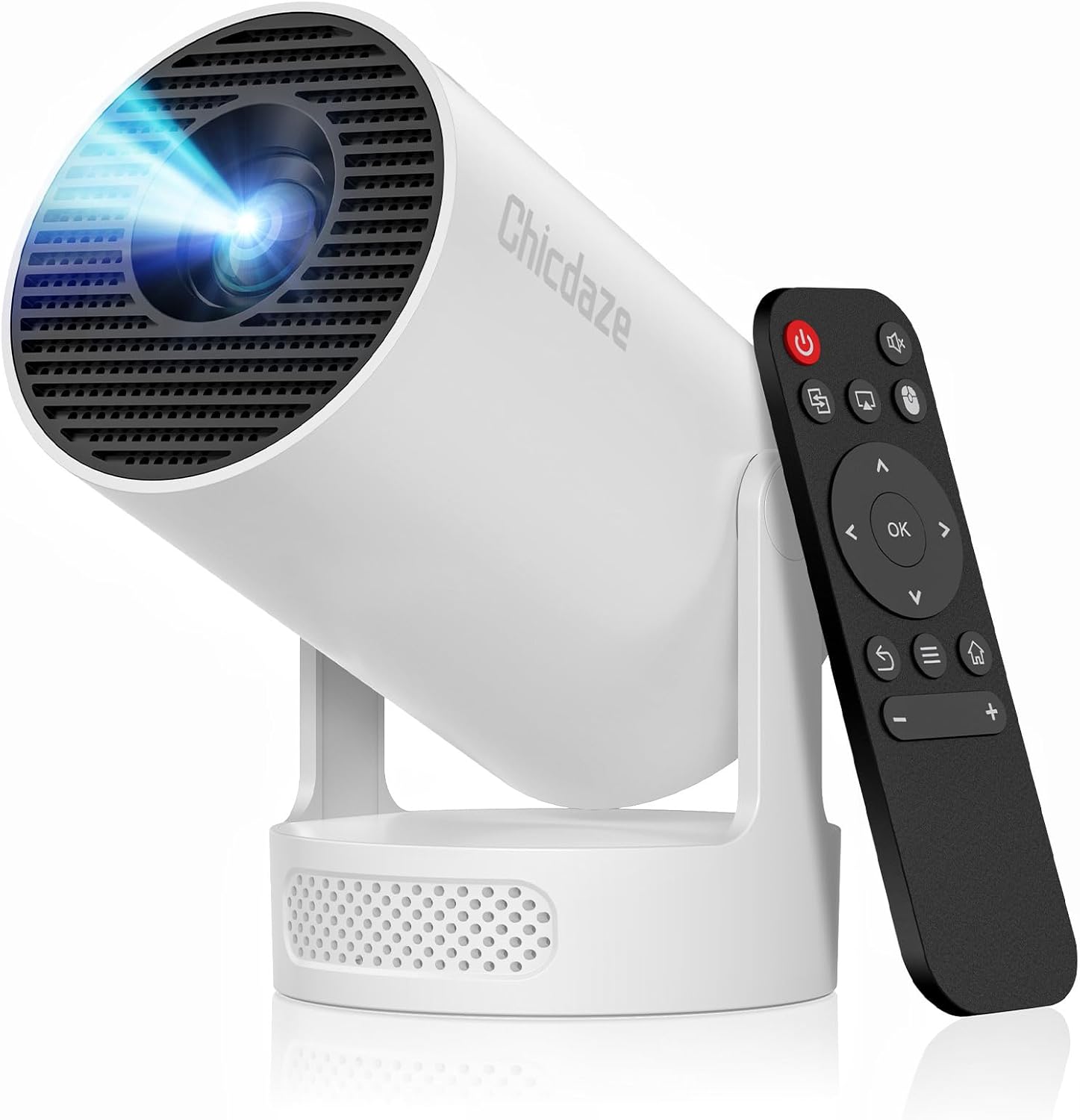
Chicdaze HY300 Pro

The Chicdaze HY300 Pro is the no-frills member of the family: a 720p swivel projector with Android TV 11 and dual-band Wi-Fi 6, a speaker inside the body and a fan rated below 25 dB.

  • PictureNative 1280 × 720, accepts 4K
  • Light160 ANSI lumens, 1500:1 contrast
  • SystemAndroid TV 11 with a Mali-G31 GPU
  • WirelessWi-Fi 6 on 2.4 and 5 GHz
  • Picture size35 to 130 in
  • FanBelow 25 dB
Perfect for
  • A first projector for a child's room or a dorm
  • Films from a USB stick, including H.265 files
  • Ceiling cartoons from a nightstand
Look past it if
  • Lounges that never get fully dark
  • Sound that fills a room without an extra speaker
  • Focus that adjusts itself
Start the show

The Chicdaze HY300 Pro keeps the swivel projector simple

Chicdaze's HY300 Pro skips the speaker base, the motor focus and the air-mouse remote that pricier models add. What is left is the core of an HY300: a 720p panel in a cylinder that swivels 180 degrees, with streaming apps on board. For a child's bedroom or a first dorm projector, that core covers most evenings.

Here is what the Chicdaze Pro brings to movie night:

  • Android TV 11 with Prime Video and YouTube built in, running on a Mali-G31 graphics core.
  • Dual-band Wi-Fi 6. The 5 GHz band keeps a stream from stuttering when the building's 2.4 GHz channel is crowded.
  • A 360-degree speaker inside the body, so sound spreads around the projector rather than firing one way.
  • A quiet fan, rated below 25 dB, low enough to disappear under film dialogue.
  • HDMI, USB and an audio output for a stick, a laptop, a flash drive or a wired speaker.

The panel is native 1280 × 720 and takes signals up to 4K, scaling them down. Chicdaze quotes 160 ANSI lumens with a 1500:1 contrast ratio in its feature notes, while its technical sheet says 200. The honest planning figure is the lower one: a picture that shines in a dark bedroom and fades once the lamps are on.

The body measures 5.1 × 5.7 × 6.7 in, small enough for a bedside table next to a lamp and a glass of water. Keep a hand's width of clearance at the vents and the fan can stay at its quiet setting.

Same text, different badge. The Chicdaze Pro shares its feature list almost line for line with ear&ear's HY300 Pro and with Chicdaze's own Pro+. Expect a very similar projector inside all three boxes.
Tech sheet

Lens, light and ports

SpecValue
ModelChicdaze HY300 Pro
DisplayLED-lit panel, native 1280 × 720
Signal inputUp to 4096 × 2160, scaled to 720p
Brightness160 ANSI lumens (200 on the technical sheet)
Contrast1500:1
Picture size35–130 in
FocusManual
KeystoneAuto
Rotation180° free swivel
SpeakerBuilt-in, 360° surround sound
SystemAndroid TV 11
GraphicsMali-G31 GPU
Wi-FiWi-Fi 6, dual-band 2.4 / 5 GHz
Bluetooth5.0 in the feature notes (5.4 also quoted)
PortsHDMI, USB, audio out
Video decodingH.264, H.265
Fan noiseBelow 25 dB
Size5.1 × 5.7 × 6.7 in
ColourWhite

Cartoons, a laptop and a USB film night on the Chicdaze Pro

The Chicdaze Pro earns its keep on easy, low-stakes evenings. Cartoons on the ceiling, a laptop slideshow for the family, a film saved on a flash drive. Each one takes a different route into the projector.

SourceHow it connectsWorth knowing
Streaming appsWi-Fi 6, built-in Android TV 11Prime Video and YouTube run on the projector
Films on a flash driveUSB portH.264 and H.265 files play directly
Laptop or tabletHDMI cableShown at 720p, fine for photos and slides
Streaming stickHDMI portCovers apps the built-in system lacks
Wired speakerAudio outputNo Bluetooth delay on dialogue

H.265 support matters more than it sounds. Phones and many downloads now save video in that format because it halves file sizes, and a projector that cannot decode it stutters or refuses to play.

Where the Chicdaze Pro fits best:

  • A child's bedtime. Swivel the lens to the ceiling and let a cartoon play while the lights are off.
  • Online lessons or video calls at a desk, the uses Chicdaze itself lists alongside home cinema.
  • A sleepover with a 60- to 80-inch picture on a bedroom wall.

For the biggest pictures of 100 inches and up, wait until the room is fully dark; 160 lumens spreads thin across a large wall. A matte white wall or a simple pull-down screen does more for the image than any menu setting. The brightness settings guide covers the picture modes that help.

On the HY300 shelf

Where it plays in the range

HY300 projector models by type, September 2026. Highlighted: Chicdaze HY300 Pro.

Squaring and focusing the Chicdaze Pro on a bedroom wall

Chicdaze rates the Pro for pictures from 35 to 130 inches but does not print a throw ratio. Its Ultra sibling throws 100 inches from about 2 m, a sensible starting point here too. A tape measure on the first evening confirms the real figure.

  1. Set the projector on a table level with the middle of the wall and swivel the lens forward.
  2. Power on, choose a language and join the 5 GHz band of your Wi-Fi.
  3. Install the system update before opening any apps.
  4. Turn the focus wheel until the small text in the corners is as sharp as the centre.
  5. Let the auto keystone square the picture, then fine-tune by hand if the projector sits to one side.

The speaker suits a bedroom at normal volume. For a larger room, the audio output feeds a wired speaker with no delay, which keeps lips and voices in step. Bluetooth headphones work too, though the feature notes list Bluetooth 5.0 and some headphones lag a fraction behind the picture.

Common first-night snags and their fixes:

  • Blurry edges only. The projector is tilted; level it before reaching for the keystone.
  • An app refuses to play. Update the system first, then try a streaming stick in the HDMI port.
  • The remote does nothing. It is infrared, so point it at the projector body.
Swivel, then refocus. Pointing the lens from wall to ceiling changes the distance, so every swivel needs a small turn of the focus wheel.

For a ceiling picture, the height of the room sets the size. On a nightstand under a standard 2.4 m ceiling the lens sits about 1.8 m from the plaster, enough for a picture in the 80-inch range. Lower ceilings give a smaller, brighter image, which suits 160 lumens well.

The HY300 manual in plain English explains every button and menu.

Also showing

Three other projectors

1 Chicdaze HY300 Ultra
Same maker, speaker base Chicdaze HY300 Ultra
Chicdaze's HY300 Ultra adds a 5W SoundBase, a night sound mode and six-way auto keystone.
  • HY300 Ultra · Android 11
  • Wi-Fi 6 + Bluetooth 5.4
  • Manual focus, auto keystone
Start the show
2 Magcubic HY300 Pro (classic)
Lighter in the bag Magcubic HY300 Pro (classic)
Magcubic's classic HY300 Pro weighs 0.77 lb with Wi-Fi 6, Bluetooth 5.4 and a 50,000-hour light source.
  • HY300 Pro
  • Wi-Fi 6 + Bluetooth 5.4
  • Manual focus, auto keystone
Start the show
3 Alwtniet HY300 Pro
Newer Android Alwtniet HY300 Pro
Alwtniet's HY300 Pro runs Android 14 on an Allwinner H726 with 200 ANSI lumens and a 5W speaker base.
  • HY300 Pro · Android 14
  • Wi-Fi 6 + Bluetooth 5.4
  • Manual focus, auto keystone
Start the show

Chicdaze Pro, its Pro+ twin and the ear&ear Pro

Three Android 11 projectors share nearly the same description: this Chicdaze Pro, the Chicdaze Pro+ and ear&ear's HY300 Pro. The differences are small, and one Pro+ build breaks away with a speaker base and electric focus. Magcubic's classic Pro offers a lighter alternative.

ModelLightFocusWhat stands out
Chicdaze HY300 Pro160 ANSIManualAndroid TV 11, audio output, H.265
Chicdaze HY300 Pro+160 ANSI; 260 on the Plus buildManual; electric on the Plus buildPlus build adds a 5W base and electric focus
ear&ear HY300 Pro200 ANSIManualKaraoke build with two microphones
Magcubic HY300 Pro (classic)200 ANSIManualBluetooth 5.4, 0.77 lb, 50,000-hour light source

Between the Chicdaze Pro and the standard Chicdaze Pro+, the gap is thin. Both quote 160 ANSI lumens, Android TV 11, a Mali-G31 core and the same 5.1 × 5.7 × 6.7 in body, and both name Bluetooth 5.4 in their headlines with 5.0 in the notes. Pay for the Pro+ name only if you take its Plus build.

Choose the Chicdaze Pro when the budget is tight and the room is dark. Pay a bit extra for the Chicdaze Pro+ Plus build if the projector has to be its own speaker. For a Pro that weighs less in a travel bag, Magcubic's classic model is the lighter pick.

Three checks before ordering:

  • Curtains. 160 lumens needs a room you can darken.
  • Cables. HDMI and audio cables are not part of the box contents.
  • A stand. The HY300 stands and mounts raise the lens when a table is too low.

Before the lights go down

Setup and screen questions

What Android version does the Chicdaze HY300 Pro run?

Android TV 11, with Prime Video and YouTube built in and a Mali-G31 graphics core.

Can the Chicdaze HY300 Pro play H.265 files from USB?

Yes. It decodes H.264 and H.265, so most phone videos and downloads play straight from a flash drive.

How bright is the Chicdaze HY300 Pro?

Chicdaze quotes 160 ANSI lumens in its feature notes and 200 on its technical sheet. Either way it wants a dark room for pictures above about 80 inches.

Does the Chicdaze HY300 Pro have a headphone jack?

It has an audio output alongside HDMI and USB, so wired headphones or a wired speaker plug straight in.